

Standard Operating Procedure
Initial Ticket Handling — Circuit or Phone Line Issue
|
Department |
Network Operations / Customer Support |
|
Effective Date |
July 2026 |
|
Version |
Version 1 |
|
Task Source |
Customer-Submitted Ticket |
|
Owner |
Aprilyn Capunitan — T1 Support Associate |
|
Approver |
John Martinez — T1 Manager |
1. Purpose & Scope
1.1 Non-Technical Overview
The purpose of this procedure is to guide Tier 1 Support Associates in handling inbound customer tickets reporting circuit or phone line issues. This SOP ensures every customer receives a prompt acknowledgment, that the affected location is verified in HubSpot before action is taken, and that the customer is kept informed throughout the troubleshooting and resolution process.
1.2 Technical Scope
This procedure applies to all inbound tickets received from customers reporting internet circuit or phone line issues for locations managed under Hyper Networks. It covers initial ticket acknowledgment (within 3 minutes), HubSpot deal verification using address, IP address, or circuit ID, carrier engagement via HubSpot Contacts, timely customer updates, and a 24-hour monitoring hold before ticket closure.
Process Flow Diagram
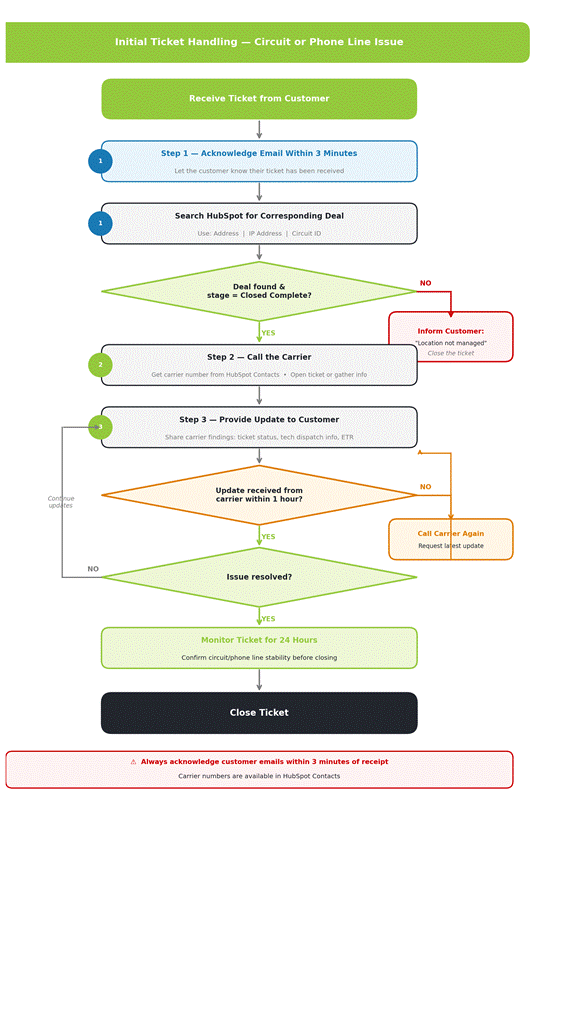
STEP 1 | Acknowledge the Ticket & Verify the Deal in HubSpot
Upon receiving a ticket from the customer, take the following actions immediately:
|
⏱ Acknowledge Within 3 Minutes Reply to the customer's email to confirm their ticket has been received. This must be done within 3 minutes of receiving the ticket. |
Next, search HubSpot for the corresponding deal using any of the following details provided by the customer:
- Address
- IP Address
- Circuit ID
Once you locate a potential deal, confirm the following before proceeding:
|
✔ |
The deal is billed under Hyper Networks. |
|
✔ |
The deal stage is Closed Complete. |
|
✖ If criteria are NOT met: Inform the customer that Hyper Networks does not manage that location. Close the ticket. Do NOT proceed further. |
|
✔ If criteria are met: Proceed to Step 2 and begin assisting the customer. |
STEP 2 | Call the Carrier
Contact the carrier as needed to gather information or to open a support ticket on behalf of the customer.
|
📋 Where to Find Carrier Contact Numbers Look up carrier contact numbers in HubSpot Contacts associated with the deal. |
When contacting the carrier, aim to:
- Obtain the current status of the circuit or phone line.
- Determine whether there is a known outage, maintenance, or fault.
- Open a carrier ticket if the issue cannot be resolved immediately.
- Ask for an estimated time to resolution (ETR) and a ticket or reference number.
STEP 3 | Provide Timely Updates to the Customer
Keep the customer informed throughout the resolution process. Share all updates received from the carrier, including:
- Whether a carrier ticket has been opened and the reference number.
- Whether a tech dispatch has been scheduled.
- Estimated time to resolution (ETR) if provided by the carrier.
|
⏱ 1-Hour Follow-Up Rule If no update has been received from the carrier after 1 hour, call the carrier again. Continue calling until a meaningful update is obtained. Always relay carrier updates to the customer promptly — do not wait until the issue is resolved. |
Continue providing updates until the issue is fully confirmed as resolved.
|
✔ Once the Issue Is Resolved — Monitor for 24 Hours Place the ticket on hold/monitor status for 24 hours. This ensures the circuit or phone line remains stable before the ticket is closed. Inform the customer that the ticket is being monitored for 24 hours before closure. |
Quick Reference Summary
|
# |
Step |
Action |
|
1 |
Acknowledge & Verify |
Reply within 3 minutes. Search HubSpot by Address, IP, or Circuit ID. Confirm deal is Closed Complete. If not found or not managed, close and inform customer. |
|
✖ |
Criteria Not Met |
Inform customer location is not managed. Close the ticket. Do not proceed. |
|
2 |
Call the Carrier |
Get carrier number from HubSpot Contacts. Open carrier ticket. Get ETR and reference number. |
|
3 |
Update Customer |
Share all carrier findings. If no update after 1 hour, call carrier again. Repeat until resolved. |
|
✔ |
Issue Resolved |
Monitor ticket for 24 hours before closing. Confirm circuit/phone line stability. Inform customer of monitoring period. |
Hyper Networks | Confidential | Version 1 | July 2026